The agent's map, written down
Its tools, data, destinations and permissions, each marked with how sensitive it is and signed off by your team.
Kern
Kern shows every place an AI agent can send your data, proves sensitive data cannot leave even if an attacker wrote the email it reads, and blocks any tool call you have not allowed.
An agent reads email, documents and web pages, then acts on what it reads: it searches, writes, sends and calls other tools. Any of those pages or emails can carry instructions planted by an attacker. This is called prompt injection.
Testing shows how an agent behaved against the attacks someone thought to try. It cannot show what the agent will do when it meets an attack nobody has tried yet.
Say no and you block the business. Say yes and you are accountable if the agent sends out the wrong file or deletes the wrong thing.
Approving an agent should rest on evidence you can check, the same way every other access decision does.
1,200+executives' records wiped by one agent, during a code freeze
In July 2025 an AI coding agent on Replit deleted a company's live database during a declared code freeze, after being told not to make changes without approval. Records for more than 1,200 executives and 1,190 companies were wiped. The data was later recovered, but Replit's chief executive said it "should never be possible".
Fortune, 23 July 2025, and The Register, 21 July 2025. Fortune report, The Register report.
A limit only works if something checks each action before the agent takes it. Kern writes the limits down, proves them, and checks every tool call against them. See how, step by step
After Kern
The business wants agents now, and you carry the risk if one goes wrong.
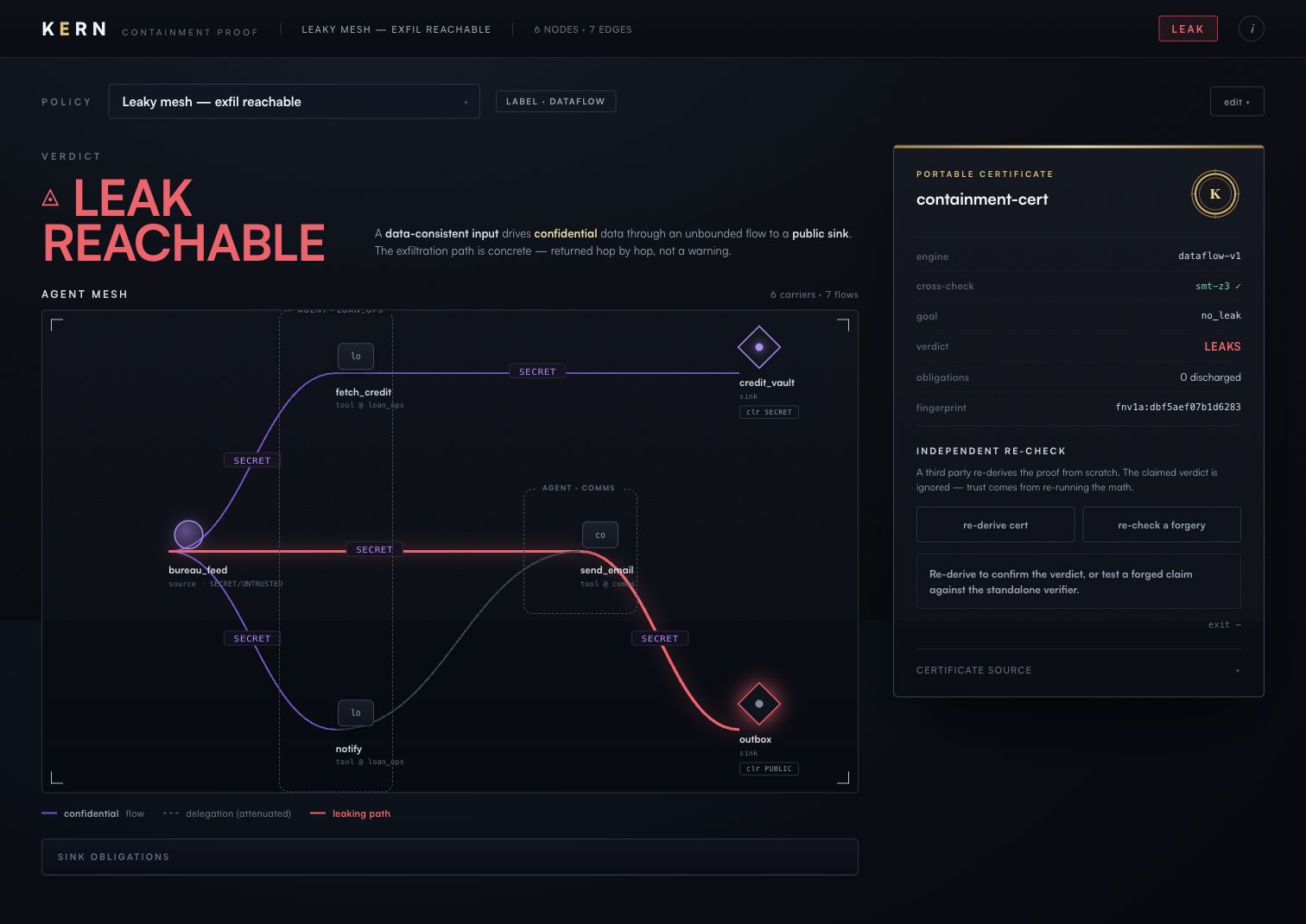
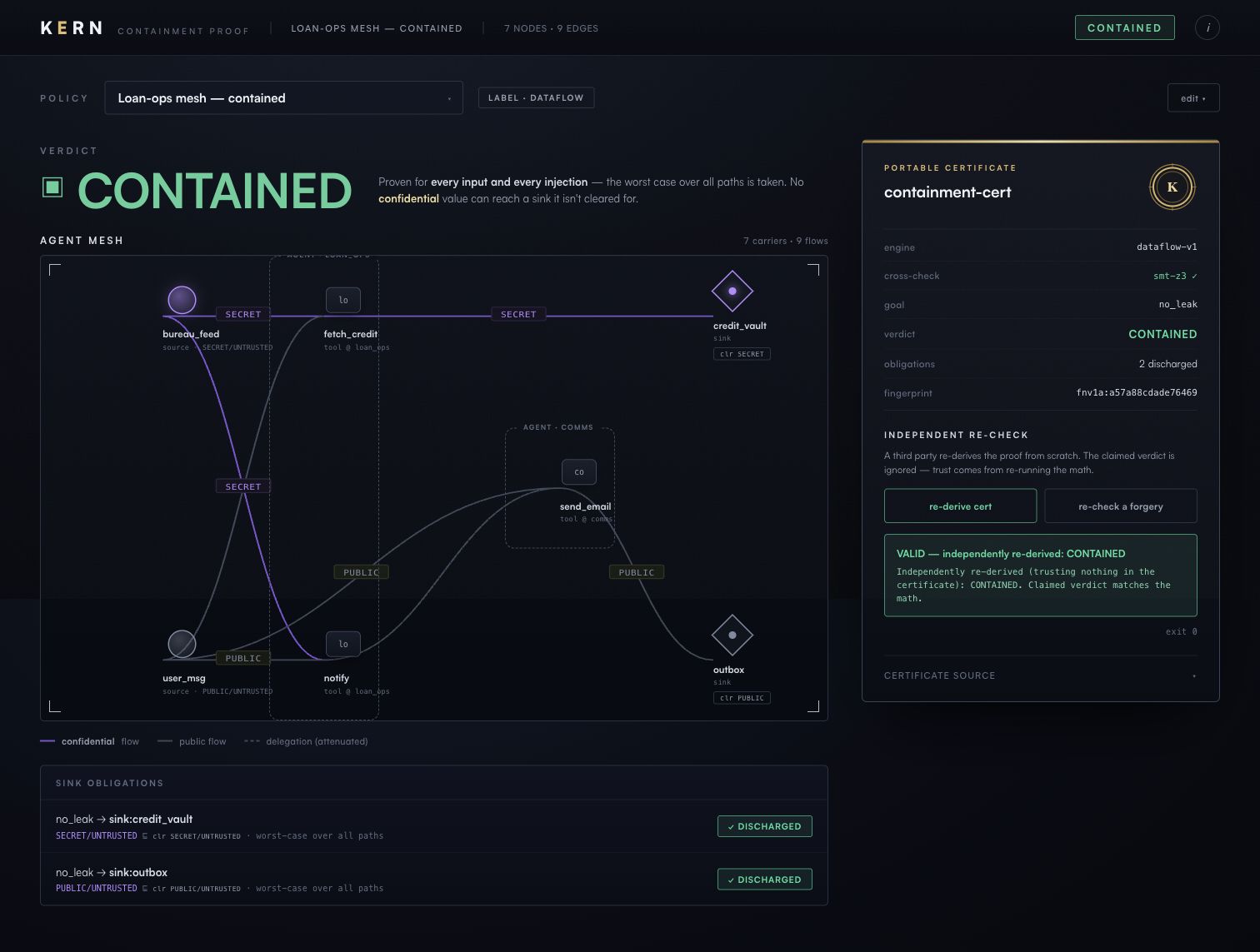
In June 2025 Microsoft fixed a critical flaw in Microsoft 365 Copilot, rated 9.3 out of 10 (CVE-2025-32711, known as EchoLeak): a single email could make the assistant send out confidential data with no one clicking anything.
We described a Copilot-style assistant with the same shape: a mailbox, SharePoint, incoming email and a send-email tool. Kern returned the exact route: mailbox, to the reply tool, to outgoing email.
With that one connection removed, Kern proved no confidential data can leave, and the separate checker confirmed it.
CVE record published by Microsoft, 11 June 2025. CVE-2025-32711, Microsoft Security Response Center.
Kern in front of the tools agents really use, allowing ordinary calls and refusing the ones you have not allowed. And a proof file with its result changed by hand, caught by the checker.
Kern in front of Microsoft's Playwright browser server, the tool agents use to drive a web browser. The agent holds a secret login token.
Kern also caught the secret by following where it came from, even when the typing tool itself was marked as safe for public data.
Kern in front of the standard filesystem server for AI agents.
Take a proof file for a setup that leaks, change the result to "safe", and hand it over. The checker re-does the work from the file, gets a different answer, and rejects it.
The Kern method
We write down what the agent can reach: its tools, the data they read, where they can send it, and which agents can ask others to act. Your team confirms how sensitive each source is. Until it is confirmed, Kern treats it as the most sensitive.
Kern checks every route, assuming anything the agent reads could come from an attacker. You get a proof that sensitive data stays where it belongs, or the exact route that must change. The proof file can be re-checked by your team, your auditor or your insurer, without us.
Kern sits in front of the agent's tools and applies the same rules to every call. Calls you have allowed go through. Any other call is refused, with the reason. When in doubt, Kern blocks.
Our promises
What you receive
Its tools, data, destinations and permissions, each marked with how sensitive it is and signed off by your team.
A proof that sensitive data has no route to the wrong place, or every route that must change, step by step.
So anyone you choose can re-check the result on their own computer.
Kern in front of the agent's tools in a test setting, showing which calls pass and which are refused.
How to start
One AI agent, in one setting, mapped, proven and enforced in a test environment in two to three weeks once we have its description. Scope agreed in writing before we start.
The pilot ends with a written review where you decide: approve, approve with the changes Kern named, or stop with the reason recorded.
Agent not built yet? We can check the design before anyone builds it.
Already running agents? Bring the tool list and we start from what they actually do.
Security leaders in organisations connecting AI agents to email, documents, customer records, browsers or files: banks, insurers, healthcare, government, law firms, and any organisation with data it cannot afford to see leave.
A description of one agent (its tools and connections), someone who knows how sensitive each data source is, one technical owner, and one person who owns the decision.
For each person in the decision
Agents that call tools through MCP, assistants connected to mail, documents and CRM, and agents that pass work to other agents. If yours is different, ask. The method is the same: map, prove, enforce.
Kern assumes any email, document or web page the agent reads could have been written by an attacker, and checks every route anyway. It does not rely on the agent behaving well.
The proof is exactly as good as the map. That is why your team signs off how sensitive each source is, why Kern starts from the strictest setting until you do, and why we review the map with you before any result is given.
A tool that runs its own code can reach anything, so no one can prove limits for it. Kern blocks those tools outright and keeps the rest of the agent working.
The map and the proof work from a description. The gate runs in your environment, in front of the tools you choose.
Anyone you give the proof file to. The checker is a separate program that re-does the work in its own code and ignores the result written in the file.
Two to three weeks for one agent, once we have its description.
Each step is fixed in scope and agreed in writing before work starts. Price is set out in the written scope, so there are no surprises later.
Kern starts from a description of the agent: the tools it can call, the data each tool can read, where each tool can send data, and which agents can ask others to act. Your team marks how sensitive each data source is and what each destination may receive. Kern then checks every route through that description, assuming anything the agent reads could have been written by an attacker.
If sensitive data can reach a destination that should not receive it, Kern shows the exact route, step by step, so your team can close it. If it cannot, Kern produces a proof file. A separate checker re-does the work from that file in its own code and confirms or rejects the result, so your auditor or insurer can check it without trusting us. The same rules then run as a gate in front of the agent's tools: allowed calls go through, and any other call is refused with the reason.
Email us a description of the agent and what worries you about it. We reply with a pilot plan.
 Sovereign